Ta
có thể dùng Dialog để lấy thông tin từ người dùng, cũng có thể dùng popup như
sau.
Tại
thư mục drawable, tạo một file tên popup_background.xml
<?xml version="1.0"
encoding="utf-8"?>
<selector xmlns:android="http://schemas.android.com/apk/res/android"
>
<item android:state_above_anchor="true"
android:drawable="@drawable/speech_background_top" />
<item android:drawable="@drawable/speech_background_bottom"
/>
</selector>
Copy vào drawable 2 icon sau với tên speech_background_top,
speech_background_bottom.


Trong thư mục layout, tạo file popup.xml.
<?xml version="1.0"
encoding="utf-8"?>
<LinearLayout xmlns:android="http://schemas.android.com/apk/res/android"
android:layout_width="wrap_content"
android:layout_height="wrap_content"
android:orientation="vertical"
>
<TextView
android:layout_width="wrap_content"
android:layout_height="wrap_content"
android:layout_gravity="center_horizontal"
android:text="This is a PopupWindow" />
<EditText
android:id="@+id/e"
android:layout_width="230dp"
android:layout_height="wrap_content"
android:layout_gravity="center_horizontal"
android:singleLine="true"
>
<requestFocus />
</EditText>
<Button
android:layout_width="wrap_content"
android:layout_height="wrap_content"
android:layout_gravity="center_horizontal"
android:onClick="close"
android:text="Close"
/>
</LinearLayout>
File activity_main.xml sẽ như sau.
<FrameLayout xmlns:android="http://schemas.android.com/apk/res/android"
android:layout_width="match_parent"
android:layout_height="match_parent">
<Button
android:layout_width="match_parent"
android:layout_height="wrap_content"
android:text="Show
PopupWindow"
android:onClick="onShowWindowClick"
/>
<Button
android:layout_width="match_parent"
android:layout_height="wrap_content"
android:layout_gravity="bottom"
android:text="Show
PopupWindow"
android:onClick="onShowWindowClick"
/>
</FrameLayout>
Class main như sau.
public class MainActivity extends Activity implements View.OnTouchListener {
PopupWindow mOverlay;
EditText e;
@SuppressWarnings("deprecation")
@Override
protected void onCreate(Bundle savedInstanceState) {
super.onCreate(savedInstanceState);
setContentView(R.layout.activity_main);
View popupContent = getLayoutInflater().inflate(R.layout.popup, null);
mOverlay = new PopupWindow();
mOverlay.setWindowLayoutMode(WindowManager.LayoutParams.WRAP_CONTENT,WindowManager.LayoutParams.WRAP_CONTENT);
mOverlay.setWidth(getResources().getDimensionPixelSize(
R.dimen.popupWidth));
mOverlay.setHeight(getResources().getDimensionPixelSize(
R.dimen.popupHeight));
mOverlay.setContentView(popupContent);
mOverlay.setBackgroundDrawable(getResources().getDrawable(
R.drawable.popup_background));
mOverlay.setAnimationStyle(R.style.PopupAnimation);
mOverlay.setTouchInterceptor(this);
mOverlay.setFocusable(true);
e =
(EditText) popupContent.findViewById((R.id.e));
}
public void close(View v) {
String
nhap = e.getText().toString();
if (nhap == null || nhap.trim().equals("")) {
Toast.makeText(this, "Bạn chưa nhập gì cả", Toast.LENGTH_SHORT).show();
}
else {
Toast.makeText(this, "Đã nhập " + nhap,
Toast.LENGTH_SHORT).show();
e.setText("");
mOverlay.dismiss();
}
}
@Override
protected void onPause() {
super.onPause();
//
PopupWindow is like Dialog, it will leak if left visible while the Activity
finishes
mOverlay.dismiss();
}
@Override
public boolean onTouch(View v, MotionEvent event)
{
// Handle any direct touch events passed to the PopupWindow
return false;
}
public void onShowWindowClick(View v) {
if (mOverlay.isShowing()) {
mOverlay.dismiss();
} else {
mOverlay.showAsDropDown(v);
}
}
}
Lúc này popup trông như sau.
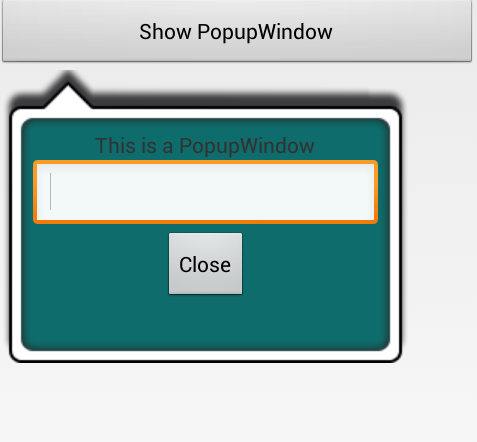
Nhập thông tin rồi ấn Close sẽ thấy thông tin được toast ra.


